Why move to MorLuang
A detailed comparison against the traditional hospital systems widely used in Thailand — covering architecture, AI, coverage handling, security and cost, so you can decide on complete information.
Home
Compare
Section 01
System architecture
| Area | Legacy systems | MorLuang |
|---|---|---|
| Delivery model | ✕ Client-server desktop application, installed machine by machine | ✓ Web-based and cloud-native — opens in a browser on any device |
| Updates | ✕ Pushed to every machine, often with downtime during the upgrade | ✓ Updated once on the server; every user has it immediately |
| Mobile and tablet | ✕ Desktop first; mobile is a separate add-on | ✓ Responsive web plus a mobile app for clinical staff |
| Real-time notification | ✕ Mostly polling — refresh to see anything new | ✓ MQTT push — badges update the instant something changes |
Section 02
AI
| Area | Legacy systems | MorLuang |
|---|---|---|
| AI in the product | ✕ Usually absent, or sold as a separate add-on | ✓ In every module from day one, at no extra licence cost |
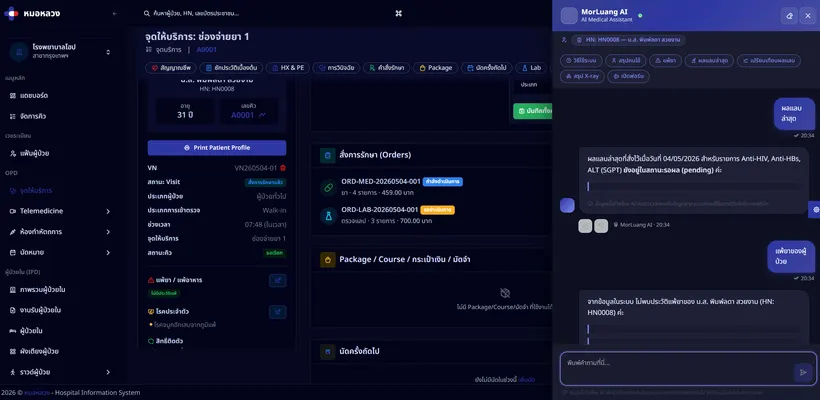
| Assistance for physicians | ✕ Read the whole record yourself | ✓ Summarises the history automatically and surfaces relevant guidance |
| Querying your data | ✕ Build the report yourself in a report builder | ✓ Ask in plain language; the assistant finds and summarises it |
| Claim checking | ✕ Fixed rule-based validation only | ✓ Analyses the claim and flags rejection risk before you submit |
Section 03
Coverage calculation
| Area | Legacy systems | MorLuang |
|---|---|---|
| Schemes supported | ✕ Mainly universal coverage and social security; others calculated by hand or customised | ✓ 13 schemes handled natively |
| Multi-scheme cascade | ✕ Patients with several schemes worked out manually, often in a spreadsheet | ✓ The engine cascades primary to secondary automatically |
| Caps per item, visit, day or year | ✕ Rules set by hand, awkward to change when a scheme revises its terms | ✓ Configured in the admin interface, with a bulk editor and CSV import |
| Allocation breakdown | ✕ Receipt shows a total; explaining the figure to a patient is hard | ✓ Line by line — exactly what each scheme covered, on the receipt itself |
Section 04
Multi-tenancy and security
| Area | Legacy systems | MorLuang |
|---|---|---|
| Multi-site deployment | ✕ A separate database per site, consolidated afterwards by hand | ✓ One multi-tenant system; every site is visible per permission, with instant group reporting |
| Isolation between organisations | ✕ Relies mainly on network and firewall boundaries | ✓ Tenant scoping at the ORM level, with cross-tenant penetration testing before every deploy |
| Audit logging | ✕ Partial — often only login events | ✓ Every access to patient data, with request ID tracing |
| Backup and disaster recovery | ✕ Set up your own cron jobs, or leave it to a DBA | ✓ Automated backups, tiered retention, and scheduled recovery drills |
Section 05
Cost and onboarding
| Area | Legacy systems | MorLuang |
|---|---|---|
| Software cost | ✕ Large capital outlay up front plus annual maintenance | ✓ Subscription by quarter, half-year or year — scale up or down as you grow |
| Servers | ✕ Buy and maintain your own hardware | ✓ Cloud-ready, with on-premise and hybrid also available |
| Training | ✕ Scheduled training sessions; miss one and staff cannot use the system | ✓ The AI assistant explains any screen on request, shortening onboarding |
| Leaving or migrating | ✕ Proprietary data formats make moving difficult | ✓ CSV and FHIR-compatible export at any time — no vendor lock-in |
“Legacy systems” here means the packages commonly deployed in Thailand and long-lived in-house systems. This comparison reflects general tendencies; each product has its own strengths and differences.
Migration
Migrating is easier than you expect
1
Assess the data
We analyse the structure of your existing system and map it across to MorLuang
2
Import the master data
Patients, medications, laboratory tests and service masters, by CSV or API as appropriate
3
Test in a sandbox
Run real work against real data in a copy of the system, and verify it before go-live
4
One-month pilot
Run alongside the old system for a month, with daily stand-ups and a hotfix process to keep risk low
5
Go live, with support
Switch over fully, with support responding to serious issues within the hour


Hospital information system software, licensed to clinics and hospitals in Thailand.